
Remote job board filters matter more in 2026 because remote job searches are crowded, competitive, and often full of listings that are not truly remote. If you are switching careers, freelancing, or trying to land a better work-from-home role, the right filters can save hours every week.
The biggest advantage of strong remote job board filters is simple: they help you remove bad-fit roles before you waste time reading them. Instead of scrolling through hundreds of listings, you can narrow by location, timezone, job type, seniority, salary, skills, and freshness.
That is why a focused remote work job board like Remote Rocketship can be useful for high-intent remote job seekers. This article explains which filters matter most, how to use them well, and why relevance often beats raw listing volume.
Official website · Latest pricing & offers
Why remote job board filters matter in 2026
The problem with broad remote job boards
Broad job boards like LinkedIn and Indeed are useful because they have massive listing volume. The problem is that volume creates noise.
A search for “remote marketing manager” or “remote software engineer” can return roles that are hybrid, location-restricted, outdated, mislabeled, or unrelated to your actual skill set. That creates a hidden cost: every irrelevant result takes attention away from applications that might actually fit.
This is where remote job board filters become a practical time-saving tool. They are not just search options; they are a way to protect your focus during a repetitive and often frustrating job hunt.
Broad boards can still be valuable, especially when you want employer research, networking, or a large pool of listings. But if your priority is to find remote jobs faster, you need filtering that reduces mismatches early.
How filters reduce search fatigue and irrelevant listings
Search fatigue happens when you spend too much time reviewing roles that are obviously wrong for you. Common examples include:
- “Remote” roles that require you to live near an office
- Senior roles shown to entry-level candidates
- Full-time roles shown to freelancers
- Jobs outside your timezone
- Listings without salary information
- Roles that use the wrong tools, tech stack, or experience level
Good remote job board filters reduce this fatigue by letting you stack requirements. For example, a product designer might filter by remote location, full-time, mid-level, salary range, date posted, and design tools.
That kind of filtering does not guarantee a job, but it makes your search more efficient. You spend less time rejecting listings and more time applying to roles that make sense.
What job seekers actually want to save time
Most remote professionals do not need the biggest possible list of jobs. They need a smaller, cleaner list of relevant opportunities.
In practice, job seekers want filters that answer questions like:
| Job seeker question | Filter that helps |
|---|---|
| Can I work from my country or timezone? | Location and timezone |
| Is this full-time, freelance, or contract? | Job type and contract type |
| Am I qualified? | Seniority and experience |
| Is the pay worth applying for? | Salary |
| Does this fit my skills? | Skills, tools, or tech stack |
| Is this listing still fresh? | Date posted |
| Can I avoid hybrid roles? | Exclusion filters |
The best remote job board filters help you answer these questions before you open the full job description. That is what makes a remote search feel manageable instead of endless.
What to look for in the best remote job board filters
Location and timezone filters
Location is one of the most important remote job search filters because “remote” does not always mean “work from anywhere.” Some employers hire remotely only within specific countries, states, regions, or timezones.
A strong remote jobs filter should help you separate:
- Worldwide remote roles
- Country-specific remote roles
- Region-specific jobs, such as US-only or Europe-only
- Timezone-aligned roles
- Hybrid roles that are not fully remote
This matters because location restrictions are one of the biggest sources of wasted time. If you live outside the hiring region, even a perfect job description may be useless.
When comparing the best remote job board filters, location clarity should be near the top of your checklist. It helps you avoid applying to roles where you would be screened out immediately.
Job type, seniority, and contract filters
Job type filters help you match your search to the way you want to work. A full-time employee, a freelancer, and a contract consultant are often looking for very different opportunities.
Useful filters include:
- Full-time
- Part-time
- Contract
- Freelance
- Internship
- Temporary
- Entry-level
- Mid-level
- Senior
- Manager or director-level
Seniority filters are especially important for career switchers and entry-level candidates. Without them, you may spend half your time reading jobs that require five to ten years of experience.
For experienced professionals, seniority filters prevent the opposite problem: being shown roles that are too junior, too low-paying, or not aligned with your growth goals.
Salary, tech stack, and experience filters
Salary filters can save a huge amount of time when they are available. Pay transparency varies by platform, employer, and location, but being able to narrow by compensation helps you focus on roles that match your financial needs.
Skills and tech stack filters are just as useful, especially in technical and specialist roles. A developer searching for React jobs should not have to manually scan dozens of Python-heavy listings. A marketer focused on lifecycle email should not have to sift through unrelated social media roles.
A practical remote job board filters list should include:
- Salary range
- Required years of experience
- Programming languages
- Software tools
- Marketing channels
- Design tools
- Operations platforms
- Customer support systems
The goal is not to make your search too narrow. The goal is to remove roles where the core requirements are clearly wrong.
Date posted and freshness filters
Freshness matters because remote jobs can attract high application volume. The longer a role has been open, the more likely it is that the employer has already received many applicants.
Date posted filters help you prioritize newer listings. This can be especially useful when you are in a competitive field like customer support, virtual assistance, marketing, design, or software engineering.
Common freshness filters include:
- Past 24 hours
- Past 3 days
- Past week
- Past month
When using remote job board filters, I usually recommend checking fresh listings first, then expanding if the results are too limited. This helps you act quickly without ignoring older roles that may still be open.
Saved searches, alerts, and exclusion filters
Saved searches and alerts turn your filtering system into a repeatable workflow. Instead of rebuilding the same search every day, you can monitor new roles that match your criteria.
Exclusion filters are just as important. These help remove terms that waste time, such as:
- Hybrid
- On-site
- Relocation
- Commission-only
- Unpaid
- Internship, if you are not looking for one
- Senior, if you are entry-level
- Entry-level, if you are senior
Many job seekers look for remote job board filters free because they want this level of control without adding another paid tool. Free filtering can still be useful, but the real value depends on whether the board gives you relevant results after filters are applied.
How Remote Rocketship’s filters help you find better jobs faster
Using filters to narrow by role fit
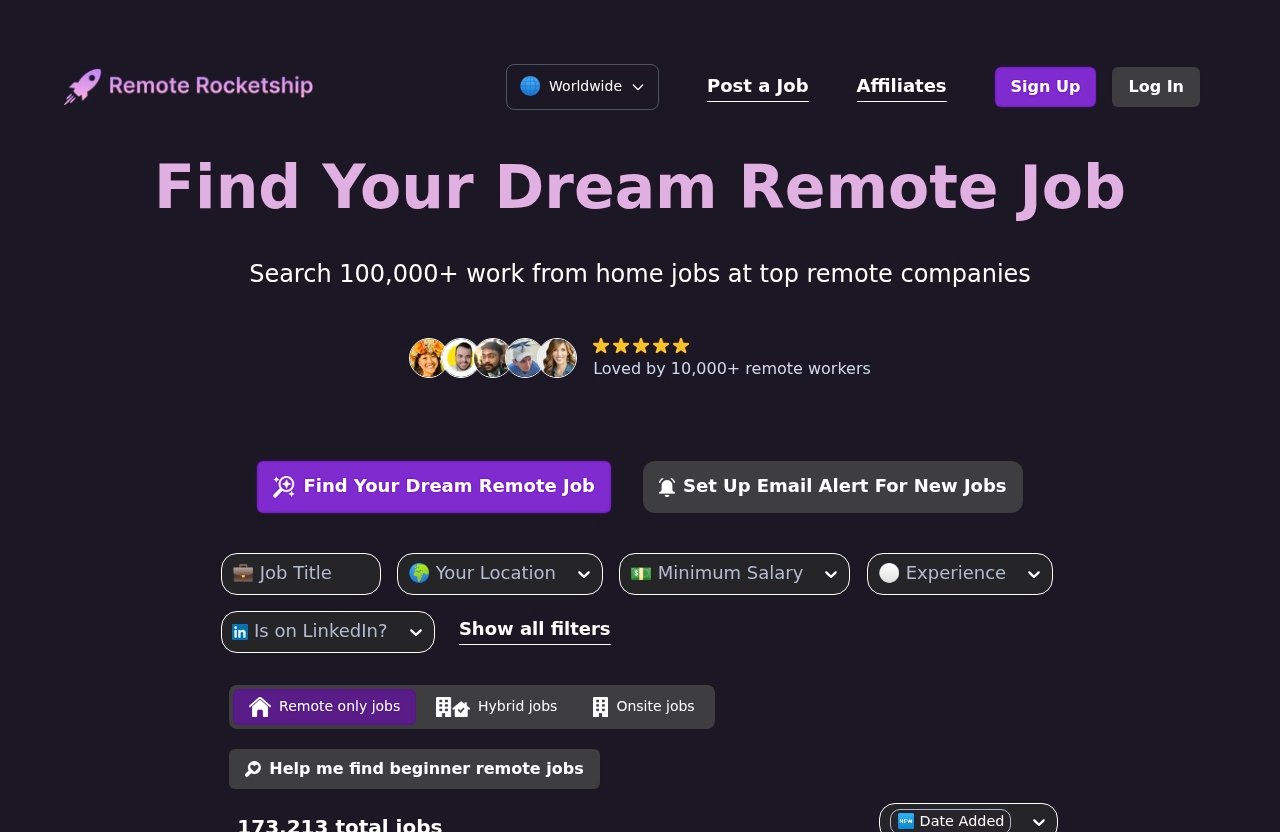
Remote Rocketship is worth considering if you want a more focused remote job search experience than a broad job board. Because official homepage and pricing page content were inaccessible during source verification due to security verification, I cannot confirm specific pricing plans, feature lists, or plan names from those pages.
That said, the commercial reason to try a remote-focused platform is clear: you are starting from a pool that is designed around remote work. When you combine that with remote job board filters, your search can become more targeted than typing “remote” into a general job board.
In a practical workflow, you would narrow by the factors that matter most to you first. For example:
- A software engineer may start with role title, tech stack, seniority, and timezone.
- A freelance marketer may start with contract type, niche, pay range, and date posted.
- A customer support candidate may start with entry-level, location eligibility, schedule, and language requirements.
This is the main value of good filtering: role fit becomes easier to judge before you invest time in the application.
How filtering beats endless scrolling
Endless scrolling feels productive, but it often is not. You may review 100 listings and apply to only three because most results are irrelevant.
Remote job board filters change the process from browsing to screening. Instead of asking, “Is anything here useful?” you ask, “Which of these filtered roles deserves an application?”
That shift matters. A smaller list of relevant roles is usually more valuable than a giant list where you must manually reject most results.
If you want to test a more focused search, you can explore Remote Rocketship and compare the experience against your usual LinkedIn or Indeed workflow. Treat pricing and specific feature details as something to confirm directly on the site, since verified official pricing details were not available from the provided source.
Why a cleaner search experience matters
A cleaner search experience helps you make better decisions. When the results are more relevant, you can spend more time tailoring resumes, writing stronger applications, and researching companies.
That is where remote board filters can create a real advantage. The time you save on search cleanup can go into higher-quality applications.
This is also why I recommend reading related guides, such as a Remote Rocketship vs LinkedIn comparison, beginner remote job search tips, and role-specific search guides. The platform matters, but your filtering strategy matters just as much.
Remote Rocketship vs broad job boards: what changes in the search experience
Broader boards can create more noise
LinkedIn and Indeed are powerful because they cover almost every industry, location, and work arrangement. But that broadness can make remote search messy.
LinkedIn, for example, allows users to select “Remote” in the location filter, then refine with job title, industry, company, experience level, and job type. That is useful, but many users still see roles that require a specific region, hybrid availability, or local eligibility.
Indeed also has a wide range of jobs, but broad keyword searches can pull in listings where “remote” appears in the description even if the job is not fully remote. This is not always the platform’s fault; employers often write inconsistent job descriptions.
Strong remote job board filters help reduce this problem by giving you a more deliberate screening process.
Filtering on a niche board versus filtering on a general board
On a niche remote board, the search starts with a stronger assumption: the user is there for remote work. On a general board, remote is just one possible work arrangement among many.
That difference affects the experience.
| Search factor | Niche remote board | Broad job board |
|---|---|---|
| Starting relevance | Usually more remote-focused | Mixed across remote, hybrid, and on-site |
| Listing volume | Often smaller | Often much larger |
| Noise level | Usually lower | Often higher |
| Best use case | Fast remote-focused search | Broad market research and networking |
| Filtering need | Precision and fit | Heavy cleanup and exclusions |
This is why the best remote job board filters are not just about the number of options. They are about how well those options reduce irrelevant listings.
Which approach is better for high-intent remote seekers
If you are casually browsing, broad boards may be enough. If you are actively applying and want to find remote jobs faster, a niche board can be more efficient.
High-intent remote seekers usually care about:
- Fully remote eligibility
- Role relevance
- Fresh listings
- Clear contract type
- Salary fit where available
- Less time wasted on hybrid roles
A practical approach is to use both. Use a remote-first board for focused applications, then use LinkedIn or Indeed for company research, networking, and additional volume.
Official website · Latest pricing & offers
Best ways to use remote job board filters to save time
Start with must-have filters first
Start with non-negotiables. These are the filters that determine whether a job is even worth reading.
Your must-have filters may include:
- Location eligibility
- Timezone
- Full-time or contract
- Seniority
- Salary range
- Required tools or skills
- Date posted
Do not begin with every possible preference. Start with the filters that remove hard mismatches, then refine from there.
This keeps remote job board filters useful without making your search too narrow.
Add exclusion filters early
Exclusion filters are underrated. They prevent repeated frustration by removing listings you already know you do not want.
For example, if you only want fully remote work, exclude terms like:
- Hybrid
- On-site
- Office
- Relocation
- Local candidates only
If you are avoiding commission-heavy roles, exclude “commission-only.” If you are not looking for internships, exclude “intern” or “internship.”
Exclusions are especially helpful on broad boards because they reduce search noise quickly.
Run separate searches for full-time, freelance, and contract roles
Do not mix every work type into one search. A full-time remote product manager role and a freelance product strategy project require different filters, resumes, and application strategies.
Create separate searches for:
- Full-time employee roles
- Freelance projects
- Contract roles
- Part-time remote work
- Consulting opportunities
This makes your results easier to evaluate. It also helps you notice which segment has the strongest demand for your skills.
For example, if contract searches produce better matches than full-time searches, you may decide to pursue fractional or consulting work while continuing to apply for permanent roles.
Review and refine alerts weekly
Alerts can save time, but only if you maintain them. If your alerts keep sending irrelevant roles, your filters need adjustment.
Once a week, review:
- Which alerts produced good matches
- Which keywords caused bad results
- Whether your location filters are too broad
- Whether your seniority level is too narrow
- Whether salary filters are excluding too many roles
The best remote job board filters work like a feedback loop. You test, review, adjust, and repeat.
Common filter mistakes that waste time
Over-filtering too early
Over-filtering is one of the most common mistakes. If you apply too many filters at the start, you may accidentally hide good opportunities.
For example, filtering by exact title, exact salary, exact tool, exact timezone, and exact seniority may produce almost no results. That does not always mean there are no jobs. It may mean your search is too rigid.
Start with must-haves, then add preferences. If results disappear, remove one filter at a time.
Ignoring freshness and application volume signals
Remote roles can become competitive quickly. If you only look at older listings, you may apply after hundreds of other candidates.
Date posted filters help you prioritize fresh roles. Application volume signals, when available on a platform, can also help you decide where to spend your effort.
A newer listing with a strong fit may deserve a tailored application right away. An older listing may still be worth applying to, but you should be realistic about competition.
Forgetting to exclude hybrid or on-site roles
Many job seekers waste time because they search “remote” but forget to exclude hybrid or on-site roles. This is especially common on broad boards.
Read the job description carefully for phrases like:
- Must be located near office
- Hybrid schedule
- Occasional office attendance required
- Remote within specific city
- Must be available for in-person meetings
Remote job board filters can reduce this issue, but they cannot replace careful reading. Always confirm whether the role is fully remote before applying.
Using too many overlapping keyword searches
Keyword overlap can create duplicate work. If you run searches for “remote content marketer,” “remote content marketing manager,” “remote SEO marketer,” and “remote growth content,” you may see many of the same jobs repeatedly.
Instead, group related searches and use filters to separate intent. For example:
- Content marketing full-time
- SEO contract roles
- Growth marketing senior roles
- Freelance writing projects
This makes your search cleaner and easier to track.
Who benefits most from strong remote job filters
Entry-level candidates
Entry-level candidates need filters because many remote listings are not truly entry-level. Some employers use “junior” while still asking for years of experience.
Helpful filters include:
- Entry-level
- Internship, if relevant
- No degree required, where available
- Training provided, where available
- Date posted
- Location eligibility
For newer candidates, remote job board filters help avoid roles that are clearly too senior. This saves time and protects motivation.
Career switchers
Career switchers need to find roles where transferable skills matter. A former teacher moving into customer success, for example, may need filters for entry-level or associate roles, specific industries, and remote-friendly companies.
Useful filters include:
- Job function
- Seniority
- Required experience
- Skills
- Industry
- Contract type
Career switchers should avoid searching only by old job titles. Instead, filter by skills and adjacent roles that match their next step.
Specialists in tech, marketing, and operations
Specialists benefit from filters because small skill differences matter. A backend engineer, paid search manager, RevOps analyst, or UX researcher should not have to manually scan broad, mismatched results.
Helpful filters include:
- Tech stack
- Tools
- Department
- Seniority
- Salary
- Timezone
- Contract type
This is where remote job board search filters can be especially powerful. Specialists often know exactly what kind of role they want, so precise filtering improves speed and relevance.
Freelancers and contract workers
Freelancers and contractors need filters that separate projects from employee roles. Without contract filters, they may waste time on full-time jobs that do not match their work model.
Useful filters include:
- Freelance
- Contract
- Part-time
- Project-based
- Short-term or long-term contract
- Hourly or fixed pay, where available
Freelancers should also filter by skill and industry. A focused freelance search is usually more effective than browsing every remote listing.
How to choose a remote job board in 2026
Filter quality
Filter quality is the first thing to evaluate. A job board may have thousands of listings, but if you cannot narrow them effectively, the experience will be slow.
Look for filters that help with:
- Location and timezone
- Role title
- Job type
- Seniority
- Salary
- Skills or tools
- Date posted
- Exclusions
- Alerts or saved searches
When comparing the best remote job board filters, ask whether the filters match the decisions you actually make before applying.
Search speed and relevance
A good remote job board should help you move from search to shortlist quickly. If you spend 30 minutes filtering and still see mostly irrelevant jobs, the board may not fit your needs.
Relevance is more important than volume for most active job seekers. Ten strong matches are better than 200 questionable ones.
This is why a remote-first search experience can be valuable. It reduces the amount of cleanup required before you find realistic opportunities.
Job freshness and listing quality
Fresh jobs give you a better chance to apply early. Listing quality helps you decide whether to apply at all.
Look for job descriptions that clearly explain:
- Responsibilities
- Required skills
- Seniority
- Location restrictions
- Compensation, where disclosed
- Contract type
- Application steps
A remote job board filters free option may still be useful if the listings are fresh and the search experience is clean. Paid or premium tools are only worth considering if they save enough time or improve match quality.
Ease of use on mobile and desktop
Many job seekers search from both mobile and desktop. A good board should make it easy to filter, save, and review roles without losing your place.
On mobile, filters should be easy to adjust. On desktop, you should be able to compare listings, open tabs, and track applications efficiently.
Ease of use matters because job searching is repetitive. The less friction you face, the more consistent you can be.
Final verdict: the fastest way to find relevant remote jobs
When a niche remote board wins
A niche remote board wins when your main goal is speed and relevance. If you already know you want remote work, starting on a remote-focused platform can reduce the amount of cleanup required.
Remote job board filters are most useful when they help you move quickly from broad interest to a focused shortlist. That is why Remote Rocketship is worth evaluating as part of a serious remote search workflow, especially if broad boards feel noisy or repetitive.
The key is to compare the results you actually get. If a board helps you find better-fit roles in less time, it earns a place in your search routine.
When broad boards still help
Broad boards still have a role. LinkedIn is useful for networking, recruiter visibility, company research, and checking whether people in your network work at target companies.
Indeed can be useful for broad market scanning and discovering employers you might not know. General boards also tend to have high listing volume.
The tradeoff is that you may need more filtering, more exclusions, and more manual review.
Why the right filters matter more than raw listing volume
The fastest remote job search is not the one with the most listings. It is the one that helps you find qualified, relevant, fresh roles with the least wasted effort.
That is why remote job board filters matter so much in 2026. They reduce noise, protect your time, and help you focus on applications that are more likely to match your location, skills, seniority, and work style.
If you are serious about finding remote work, prioritize filter quality over job count. A smaller, cleaner list can be the difference between endless scrolling and a focused application plan.
Official website · Latest pricing & offers
FAQ
What is the filter for remote jobs on LinkedIn?
On LinkedIn, you can use the location filter and select “Remote” when searching for jobs. After that, refine the results with additional filters such as job title, industry, experience level, job type, company, and date posted.
Still, read each listing carefully. Some LinkedIn jobs marked remote may have location, timezone, or hybrid requirements.
What are the best job boards for remote work?
The best job boards for remote work usually fall into two groups: niche remote-first boards and broad boards. Niche boards are often better for relevance, while broad boards like LinkedIn and Indeed are useful for volume, networking, and company research.
If you value speed, use remote job board filters on a focused remote board. If you value maximum coverage, combine niche boards with broader platforms.
How do remote job board filters save time?
Remote job board filters save time by removing listings that do not match your location, timezone, seniority, contract type, salary needs, or skills. They reduce manual scrolling and help you focus on jobs that are more likely to fit.
They are especially useful when you stack filters and exclude hybrid or on-site roles early.
How to make $1000 a week remotely?
Making $1000 a week remotely depends on your role, skills, experience, hours, and market demand. Common paths include full-time remote jobs, freelance services, contract work, sales roles, tech roles, marketing, customer success, and specialized consulting.
Use filters for salary, contract type, seniority, and skills to find higher-paying opportunities faster. Avoid any listing that promises guaranteed income with little effort.
How to make $2000 a week working from home?
Making $2000 a week from home usually requires specialized skills, senior experience, strong sales ability, or high-value freelance/consulting work. Examples may include software engineering, product management, B2B sales, paid media, cybersecurity, data, design leadership, or expert consulting.
Use remote job board filters to narrow by pay range, seniority, job type, and specialization. There are no guarantees, but a focused search helps you spend more time on roles with realistic earning potential.
Related Reading
- Remote Job Board vs LinkedIn: Which Finds Better Remote Roles in 2026?
- Remote Rocketship Search Tips 2026: Find Better Hidden Remote Jobs Faster
- How to Find Remote Jobs on Remote Rocketship in 2026: Step-By-Step Tutorial
